Trading articles/Big Updates Just Dropped Inside the Momentum Trading Strategy Web App
Jun 11, 2026 · Momentum Trading Strategy
Big Updates Just Dropped Inside the Momentum Trading Strategy Web App
The Relative Strength Stock Screener has come a long way in just a few months.
Originally published on Substack.
In the video above, I walk through the newest updates we’ve added to the Momentum Trading Strategy web app over the last month. A lot has changed. Some updates are simple quality-of-life improvements. Others are bigger upgrades that make the platform more customizable, more organized, and much more useful inside a real trading workflow.
The goal is not to build another complicated stock screener. The goal is to build a complete trading workspace around the actual process I teach: Find the strongest stocks. Track the leading groups. Build better watchlists.
Plan trades with proper risk and position sizing. Manage trades with discipline. Review your performance. Improve over time.
That is what this platform is being built around. Not random features. Not unnecessary clutter. A process.
From a Simple Screener to a Full Trading Workflow
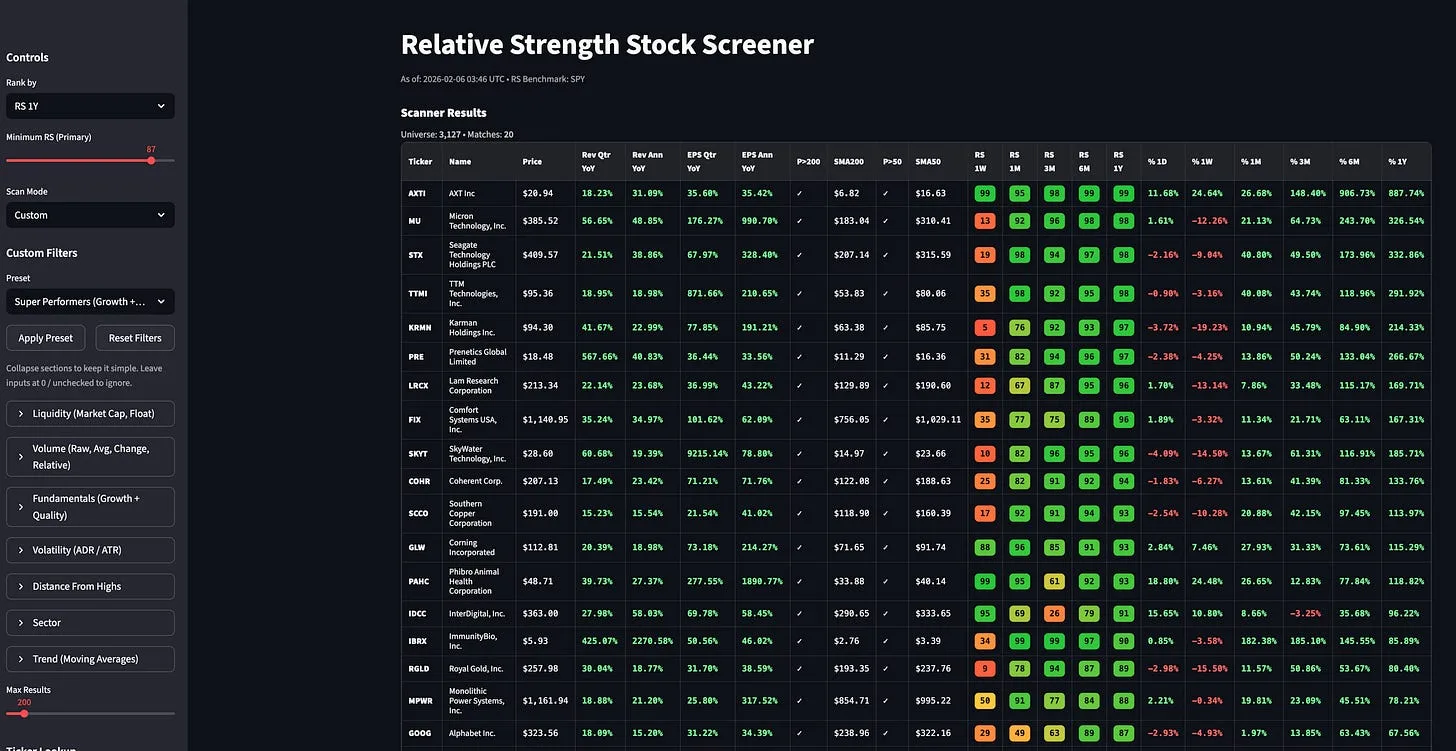
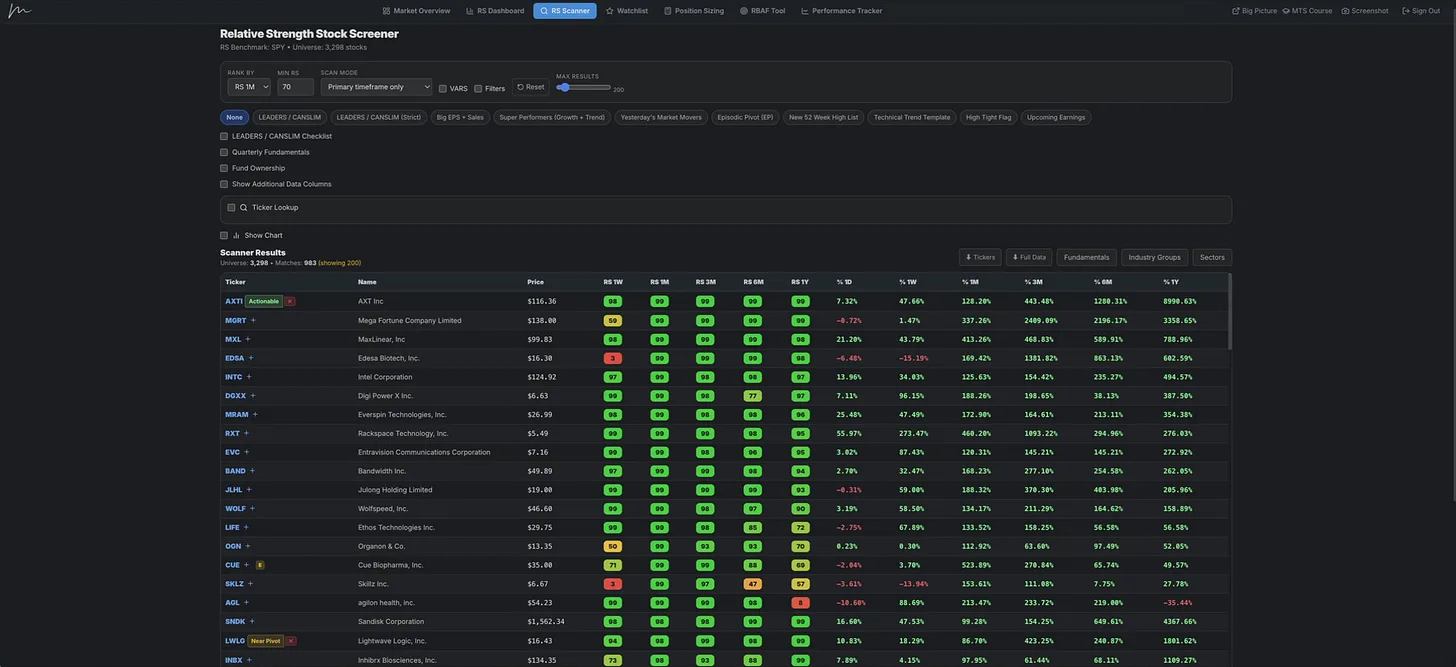
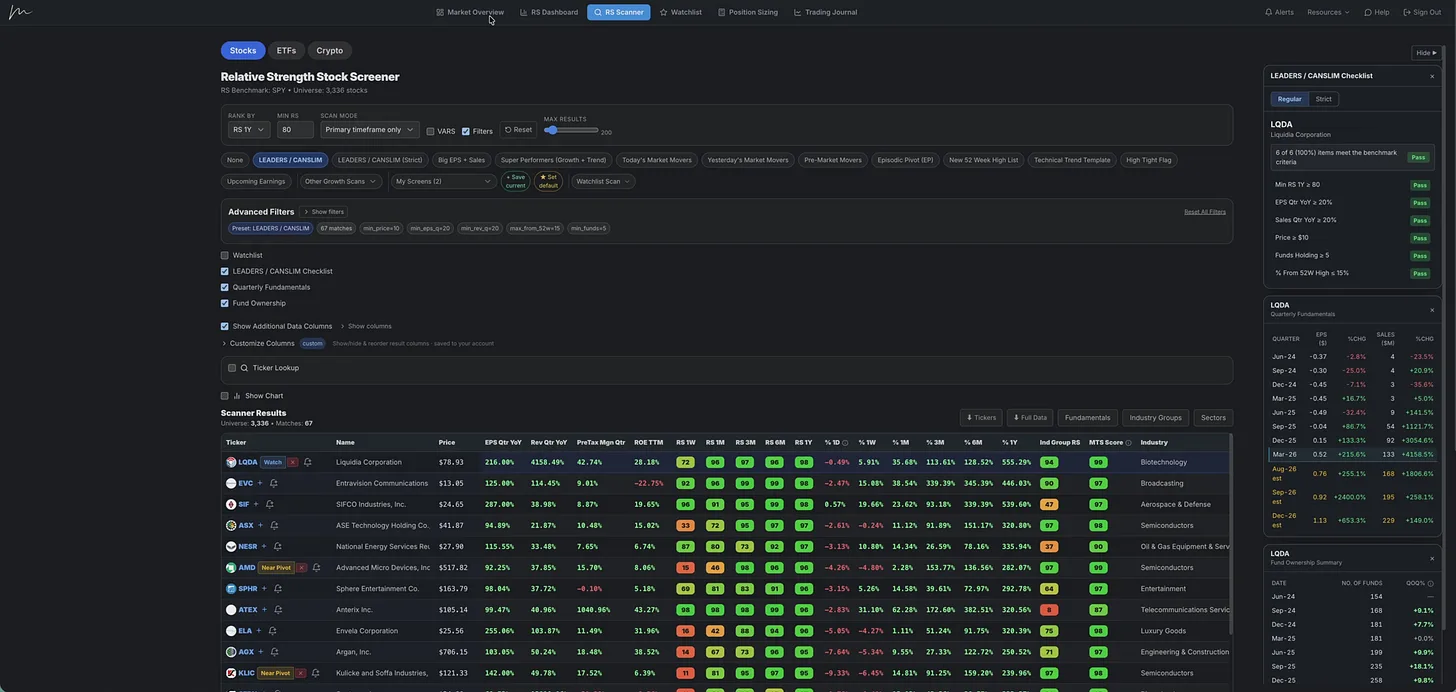
A few months ago, the Relative Strength Stock Screener was much simpler. It worked, and honestly that simple version was enough to find the best stocks in the market. But now, it has grown into something much more complete. We now have saved scans, custom columns, watchlist side panels, expanded RS dashboards, leader checklists, fund ownership data, charting, proprietary ratings, watchlist subcategories, trading journal, planning tools, analytics, and more.
From this:
To this:
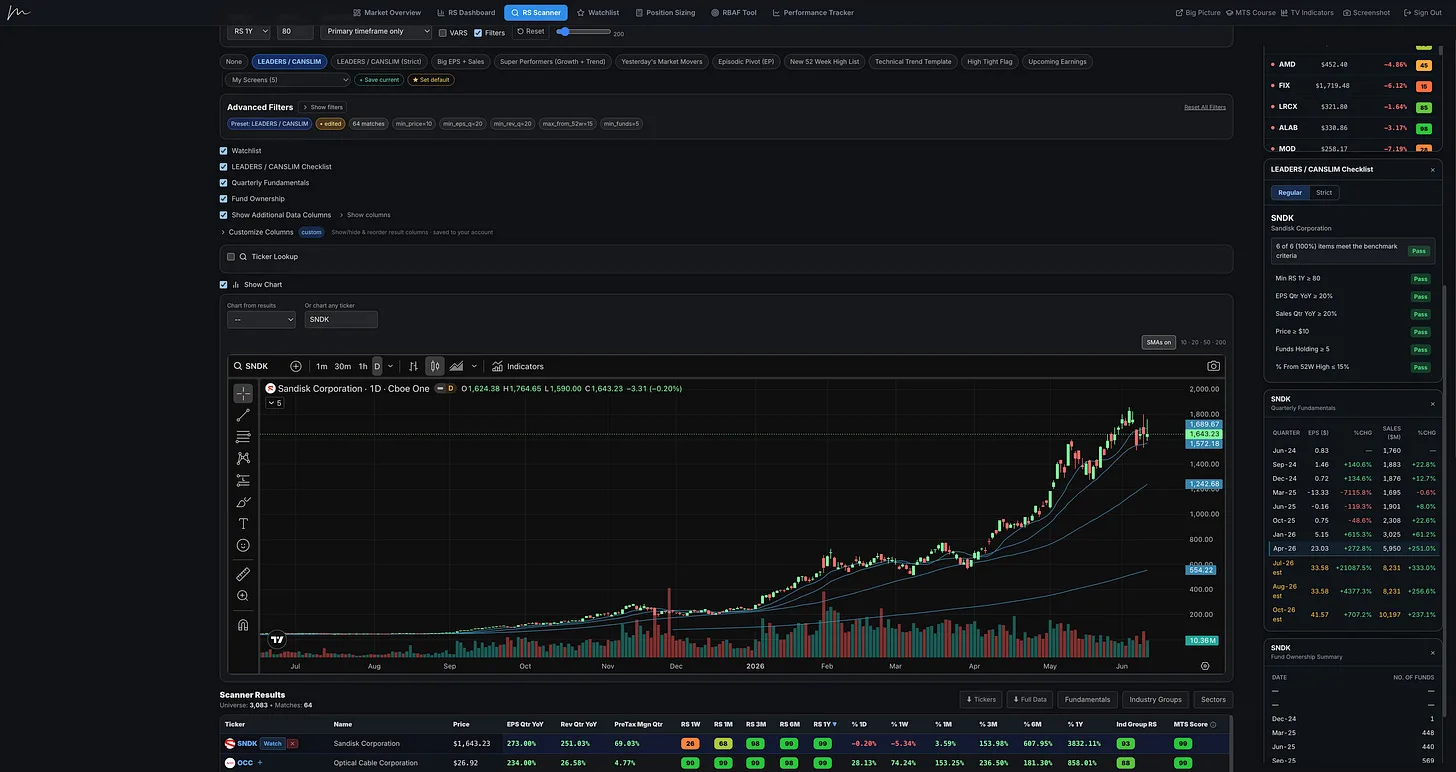
All in just a few months. This is not a static tool. It is being actively built, improved, and shaped by the feedback coming from the people actually using it. A lot of these updates were not just ideas I randomly came up with. They came directly from paid subscribers using the platform and saying, “This would make my process easier.” That feedback made a huge difference, and it is helping turn the web app into a more complete trading workflow.
New Updates Inside the Trading Journal
One of the first updates is inside the performance tracker and trading journal. You can now add photos, images, and notes directly to your trades. This may seem like a small feature, but I think it is important.
A good trade review is not just about the entry price, exit price, gain, loss, or R multiple. Those numbers matter, but they do not always tell the full story. Sometimes you need to save the chart. You need to mark up what you saw. You need to write down why you took the trade, what the market looked like, what the setup looked like, what you were thinking, and what you would do differently next time.
That is where real improvement starts. The ability to go back and study your own trading decisions. What did I do well? Where did I force the trade? Was the setup actually there? Did I buy too extended?
Did I size too aggressively? Did I sell too early? Did I ignore the market environment? Did I follow my plan?
Adding images and notes to the trading journal makes that process much easier. You can now build a better record of your trades, your thought process, and the chart evidence that was there at the time.
Save Your Own Custom Scans
One of the biggest updates inside the Relative Strength Stock Screener is the ability to save your own custom scans. This is a feature a lot of people wanted. Before, if you had a specific advanced scan you liked to run, you had to rebuild it each time. Maybe you had your own fundamental scan, sales growth scan, relative strength scan, CANSLIM-style scan, or technical scan.
Now, once you create it, you can save it. You can name it whatever you want and access it later from the dropdown. That means if you have a process you like to repeat, you no longer have to keep rebuilding the same scan every time you log in.
RS Dashboard Improvements
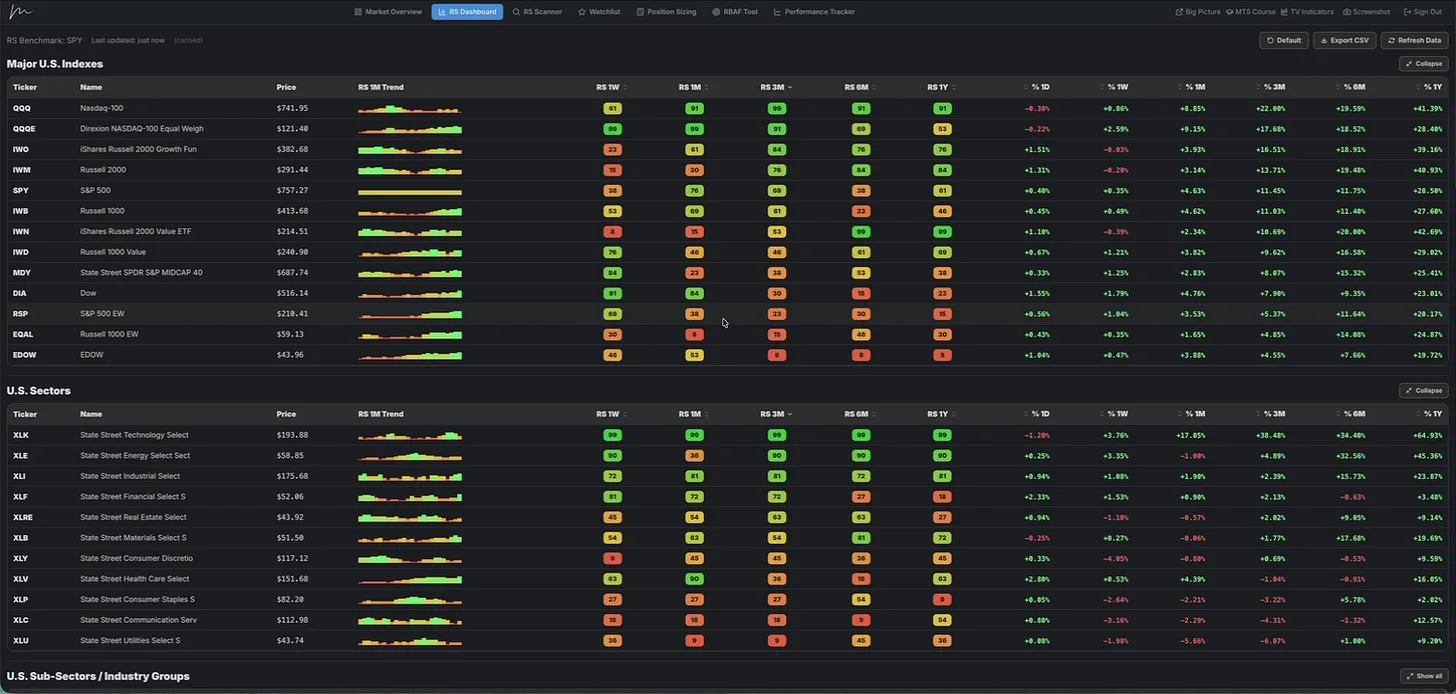
The RS Dashboard also received some useful upgrades. You can now expand the dashboard view, which makes it easier to study the data without constantly scrolling through everything. You can also sort the different sections by timeframe.
So if you want to see what is strongest over one month, you can do that. If you want to look at three month strength, six month strength, or one year strength, you can do that too. This applies across indexes, sectors, subsectors, and the broader RS dashboard.
New IPO Date Filters
We also added IPO date filters inside the stock screener. This allows you to screen for newer companies by setting a minimum IPO date or a specific IPO date range. For example, if you only want to look at stocks that came public after 2020, you can now filter for that. This is helpful for traders who like to study newer growth companies, recent IPOs, emerging leaders, or stocks that may not have decades of trading history.
Some of the biggest winners in the market come from newer companies that are still early in their public market life cycle. That does not mean every IPO is worth trading. Most are not. But when a newer company starts showing strong relative strength, strong sales growth, improving earnings, and institutional interest, I want the ability to find it quickly.
The IPO date filter helps with that.
Exclude Sectors and Industry Groups
You can now exclude specific sectors or industry groups from your scans. This is another small update that can make a big difference depending on how you trade. For example, maybe you do not trade biotech. Maybe you avoid certain industries because they are too news-driven, too hard to understand, or they do not fit your strategy.
Now you can exclude those groups directly from your scan results. You can do this with industry groups, and you can do it with sectors as well.
Industry Group and Sector Ranking by Timeframe
We also improved the industry group and sector ranking tools. We already had industry group ranking before, but now you can look at those rankings by specific relative strength timeframes. You can still look at the blended ranking, but you can also break it down by one month, three month, six month, or one year relative strength. The same applies to sectors.
This is useful because leadership can shift. Sometimes the one year leaders are still the true leaders. Other times, shorter-term rankings begin to show where new leadership may be developing. That does not mean you should blindly chase whatever group is strongest over the last month. But it does give you another way to study rotation, emerging strength, and possible new leadership.
New Sidebar Watchlist
Another major update is the new sidebar watchlist. This was another feature members asked for. A lot of traders like being able to see their watchlist while they are scanning, similar to how you might have a watchlist panel open inside TradingView.
Now you can do that inside the Relative Strength Stock Screener. You can pull up the sidebar watchlist while you are screening and quickly view the names you are already tracking.
Watchlist Subcategories
We also added watchlist subcategories. The main categories will stay organized around Watch, Near Pivot, and Actionable because I think that structure fits the actual trading process. But inside those categories, you can now create your own subcategories. That gives you much more flexibility.
You might organize stocks by: Industry group. CANSLIM names. Technical-only swing trades. Position trade ideas. Episodic pivots. Date added. Current leadership themes. Personal watchlists. Higher conviction names.
There is no perfect way to organize a watchlist. Different traders think differently. Some people organize by setup type. Some organize by industry group. Some organize by quality. Some organize by timeframe.
None of those are automatically right or wrong. The right system is the one that helps you stay prepared, focused, and consistent. That is what the watchlist subcategories are meant to support.
Custom Screener Columns
Another big update is custom screener columns. Previously, when you ran a preset scan, the result columns would change based on the filters inside that scan. That made sense. If you were running a sales and earnings scan, it would show sales and earnings data. If you were running a trend template scan, it would show moving average data.
Some of us wanted to keep the same columns visible no matter which scan they were running. Now you can do that. You can customize the columns in your scanner results and keep them locked. So if there are certain data points you always want to see, you can set them once and keep them there.
For example, you might always want to see: Quarterly EPS growth. Quarterly sales growth. Pre-tax margin. Return on equity. Industry group relative strength. MTS Score.
Once you set those columns, they stay there. Even if you switch from one preset scan to another, your preferred columns remain in place. You can also reorder the columns. So if you like to see price first, then earnings, then sales, then margins, then industry group RS, then MTS Score, you can set it up that way.
This is one of those features that makes the platform feel much more like your own workspace.
New Sales Rating
We also added a Sales Rating. This works similar to the other rating systems, using a 1 to 99 scale. A 99 rating is the strongest. A 1 rating is the weakest. This gives you a quick way to identify companies with stronger sales performance.
MTS Score by Timeframe
The MTS Score also received an upgrade. The MTS Score looks at many of the characteristics commonly found in big winning stocks. It considers things like relative strength, earnings, sales, return on equity, margins, industry group strength, and distance from the 52-week high.
Previously, the score was more focused around the traditional one-year type of rating. Now you can view the MTS Score across different timeframes, including: One month. Three months. Six months. One year.
This gives you more flexibility when studying leadership. Sometimes you want the longer-term view. Sometimes you want to see what is improving more recently.
The Bigger Goal
The point of all these updates is not just to add more buttons. That is not what I want this platform to become. A lot of trading platforms become bloated. They have tons of features, but most traders only use a small percentage of them.
Then the platform becomes overwhelming. That is not the goal here. The goal is to keep the tool powerful, but still simple enough to use inside a real process.
What We Are Working On Next
We are still moving fast, and there are more updates in development. One of the bigger things we are working on is an independent website that will make the entire member experience more user-friendly. The idea is to have a better home for the course, the platform, member resources, and eventually a better community chat. A lot of members have asked for a better chat experience, something more like a private trading desk for paid subscribers.
Think of it like a more customized version of Discord, but built into the member website.
We are also working on improving the charting inside the platform. Right now, the charting works, but I still find myself using TradingView for a lot of my chart work. That tells me we need to make it better. If we are screening through stocks inside the platform, we should be able to expand the chart, use the indicators we care about, and study the setup without feeling like we need to immediately leave the platform.
That is something we are working on.
We are also looking at adding more preset screens. There are more scans I personally run that I want to add so members can use them too. Another future update is a more selective news feed. I do not want to add a noisy news feed just for the sake of having news.
Most financial news is not useful to the actual trading process. A lot of it is just distraction. But some news does matter. If a stock gaps up on earnings, a major contract, FDA news, or some other meaningful catalyst, that can be important context.
So the goal would be a more selective news feed that highlights the types of events that actually matter to the stocks we are watching.
We are also looking at adding tutorials and help icons throughout the platform. That would make it easier for newer users to understand how different screens, ratings, filters, and tools are meant to be used. Another idea in development is an AI advisor or trading coach inside the platform. The goal would not be to replace your decision-making.
The goal would be to help you better understand the data, ask questions, evaluate setups, review trades, and use the platform more effectively. There is a lot of data on the backend that is not always visible inside the main user interface because I do not want the platform to become too crowded. An AI advisor could potentially help surface some of that information without turning the platform into a cluttered mess.
We are also working toward a better mobile version. Right now, the platform is not built for your phone. It is designed for desktop use. But I know people want to be able to check things on mobile, run quick screens, view watchlists, or monitor names when they are away from their desk.
A mobile version would likely be simpler than the full desktop platform, but still useful. Other future updates include: More watchlist improvements. Alerts tied to watchlist names. Potential brokerage sync.
Member Feedback Is Driving This
One of the things I appreciate most is that many of these updates have come directly from member feedback. People using the platform are finding things that could be better, easier, cleaner, or more useful. That is exactly what I want. If you are a paid subscriber and you are using the web app, keep sending feedback.
If something feels clunky, let me know. If there is a filter you wish existed, let me know. If there is a feature that would make your process easier, let me know. If there is something you do repeatedly that could be simplified, let me know. I cannot promise every request will be added, but a lot of the best ideas have come from members actually using the tool.
That is how this gets better.
New Around Here?
If you are new and this is one of the first platform videos you have watched, this video is mainly a feature update.
It is not meant to be a full tutorial on how to screen for stocks.
If you want to better understand how I actually use the Relative Strength Stock Screener to find leading stocks, I would recommend going back through some of the previous posts and videos.
A few good places to start:
Watch Me Screen for the Market’s Strongest Stocks
 Watch Me Screen for the Market’s Strongest StocksIn this video, I walk through the same screening process I covered in the recent article, How I Find the Biggest Winning Stocks in the Market, but this time I show it inside the Momentum Trading Strategy Web App.Jun 4, 2026 · Read on Substack →
How I Actually Use the Relative Strength Stock Screener to Find Winning Growth Stocks
 How I Actually Use the Relative Strength Stock Screener to Find Winning Growth StocksThis video provides a deeper walkthrough of how I actually use the Relative Strength Stock Screener day-to-day, so I recorded this full breakdown showing my complete process from start to finish.May 10, 2026 · Read on Substack →
I Didn’t Miss the Move. You Stopped Working the Watchlist.
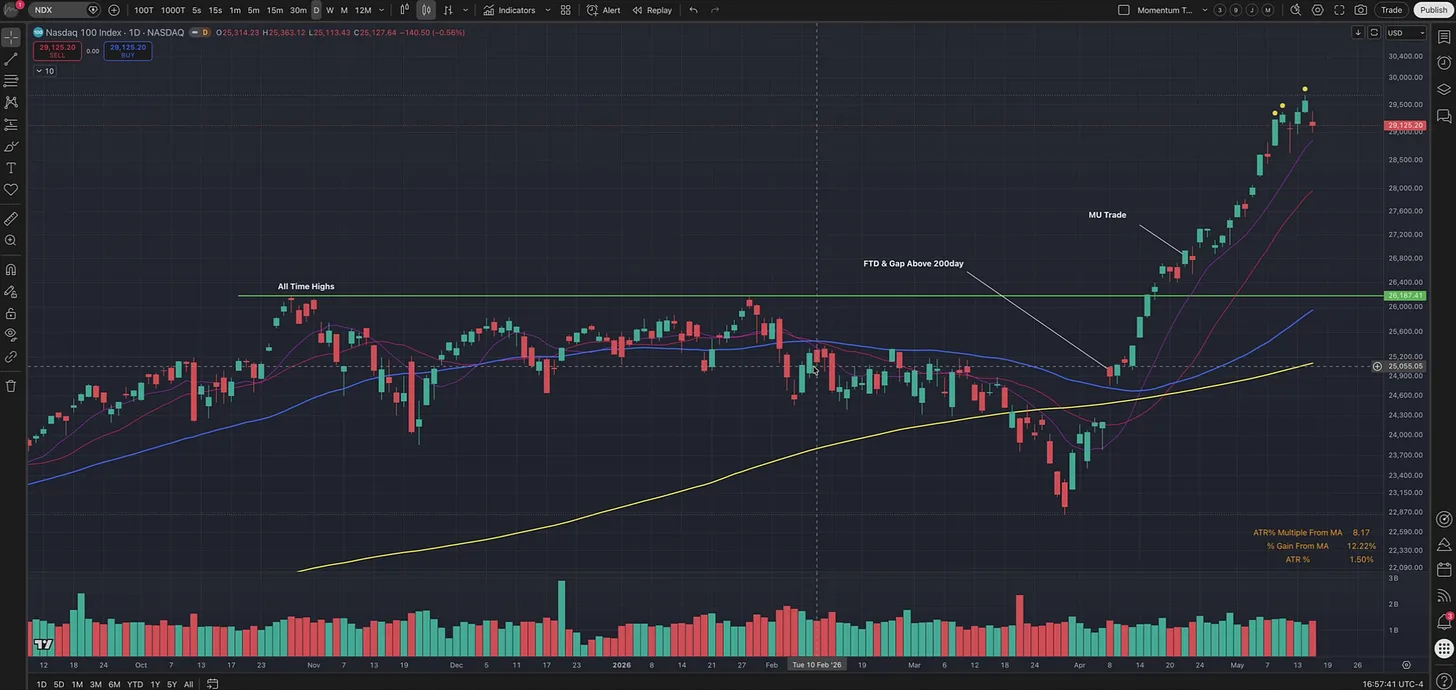 You Didn’t Miss the Move. You Stopped Working the Watchlist.The Mistake Traders Make After a Market TurnMay 17, 2026 · Read the article →
Those posts will give you a better feel for how the tools fit together.
Because the platform is not just about finding tickers, but support everything you will learn in the Momentum Trading Strategy Course.
 Momentum Trading Strategy: The 100-Year Playbook Behind the Biggest Winning StocksMost people approach the stock market backwards.Mar 5, 2026 · Read on Substack →
More in Software & Tools
All Software & Tools articles →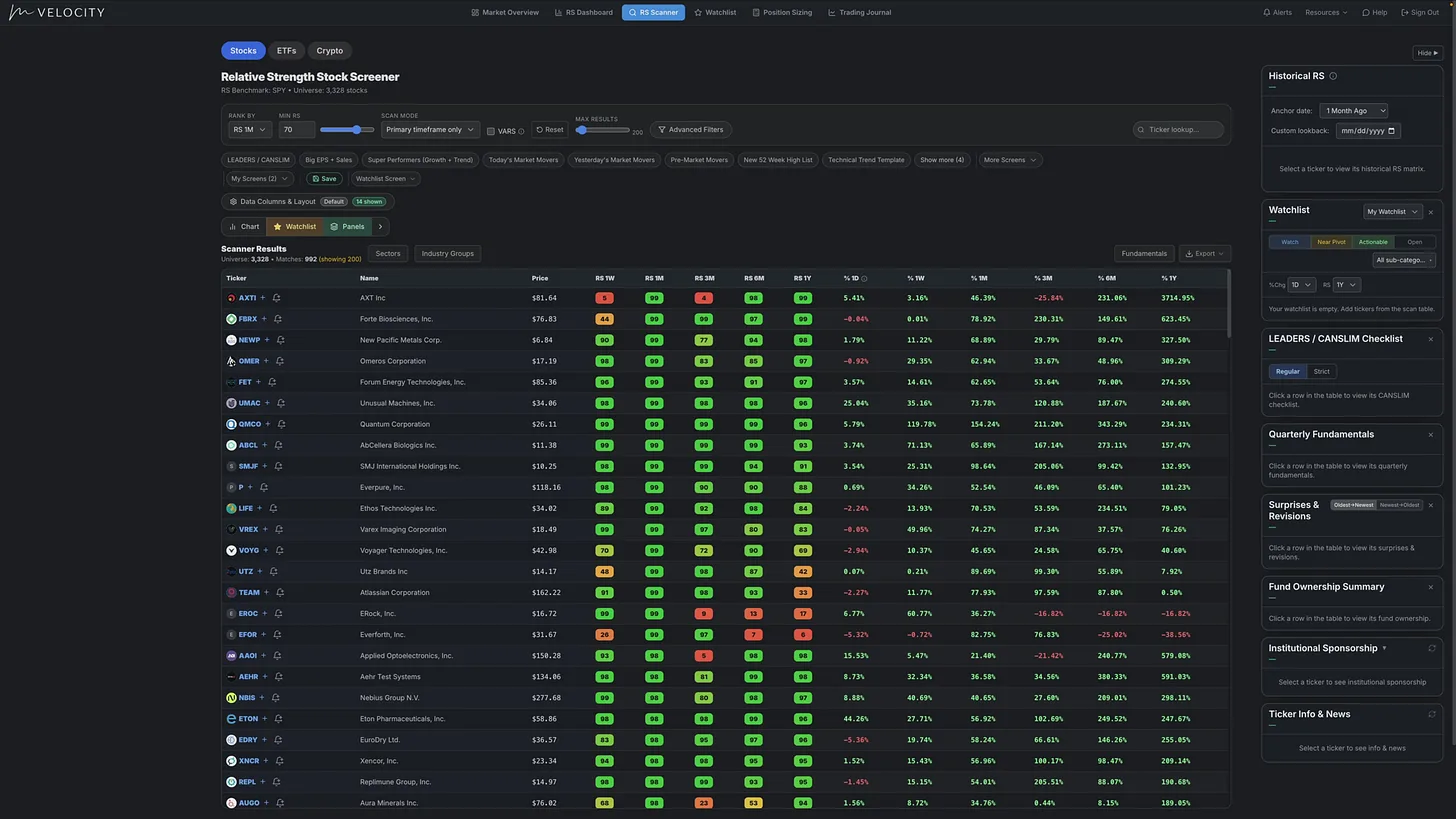
Aug 15, 2026 · Software & Tools
MTS Velocity: How I Find the Market’s Strongest Stocks | Complete Software Tutorial
See how I use Relative Strength, stock screens, charts, watchlists, risk tools, trade planning, journaling, and analytics to find and manage leading stocks.
- Momentum Trading
- CANSLIM
- Growth Stock Trading
- Stock Market
- growth stock investing
- Relative Strength Stock Screener
- Momentum Trading Strategy
- Find Stocks
Jul 3, 2026 · Software & Tools
Inside the Momentum Trading Strategy Software: A Full Trading Process in One Platform
See how the platform helps traders read the market, find relative strength, manage risk, and review performance from start to finish.
- Momentum Trading
- CANSLIM
- Trading Journal
- position trading
- Growth Stock Trading
- Stock Scanner
- Relative Strength Stock Screener
- Momentum Trading Strategy
Apr 30, 2026 · Software & Tools
Start Here: The Complete Roadmap for Learning Momentum Trading the Right Way
Learn how to read the market, find leadership, manage risk, and build a repeatable momentum trading process without chasing stock tips
- growth stocks
- learn to trade
- Learn Trading
- Investing
- CANSLIM
- Trading
- position trading
- Growth Stock Trading